Challenges in Tracking Employees Location: Common Problems Businesses Face
Your customer calls at 3 p.m. He inquires, ” Has your employee arrived?. He arrived at the location an hour ago, according to your sales representative. According to the employee monitoring software, he is two kilometers away. Who is correct?
Businesses that manage employees outside the office experience these difficulties often. GPS data is not always reliable. Attendance data is not accurate. Updates are delayed, visits are difficult to confirm, and employees feel uncomfortable being monitored.
Employee location monitoring issues are clearly covered in this blog, along with their causes, effects on a company, and solutions for managers. Whether you use a spreadsheet, an app, or just make phone calls these days, the steps are useful and effective to implement.
Why Employee Location Tracking Goes Wrong: Common Technical and Practical Causes
Table of Contents
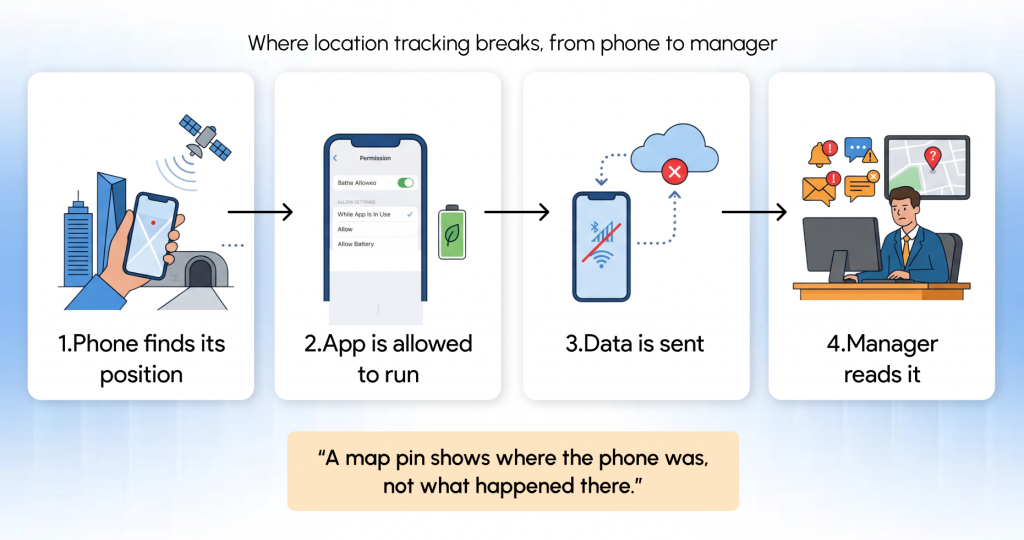
Most location tracking problems don’t come from anyone doing something wrong. They come from how phones, networks and daily field work behave. Here are the four places where tracking most often breaks down, and why.
GPS Location Inaccuracy and Connectivity Problems
GPS position is not always a precise location; it is just an estimation. A phone uses satellite signals to determine its location; this process is aided by Wi-Fi and mobile network data. That’s usually near enough, but it’s not always.
Imagine a salesperson entering a warehouse. The signal is blocked by the roof, and the phone displays his most recent location outdoors. The same impact may also result from several other factors:
Signal obstruction: Tall structures, tunnels, and underground areas can weaken or reflect signals.
Device settings: Positions may become less accurate while using a low-accuracy location mode.
Location permissions: If the app is permitted to utilize location only when it is open, updates stop when the screen is off.
Battery limitations: Background activities may be paused in power-saving modes.
Connectivity: Even if the phone is aware of its location, it cannot transmit data until it is back online.
Even when an employee has done nothing illegal, the result seems inaccurate, incomplete, or delayed.
Our youtube link for your location-related problems:
Attendance Tracking Errors and Missed Check-Ins
Location-based attendance depends on employees arriving at the appropriate time and location. The record is lost or delayed when a network fails, a battery runs out, or someone forgets. Even someone who was on time may appear to be a late starter.
It’s beneficial to distinguish between two frequently confused concepts. A record of attendance indicates that a person checked in. Verified fieldwork demonstrates what really took place there. One does not always prove the other.
Difficulties in Verifying Field Employee Visits
A map pin next to a customer’s address is not evidence of a client visit. It indicates the presence of a device. It’s possible that the worker parked his vehicle outside, stopped by the store next door, or both.
- Companies typically obtain a more trustworthy image by integrating multiple data points:
- Timestamps from check-in and check-out that indicate how long an employee stayed
- Information about the visit, including the client’s name, goal, and result
- Uniform reporting formats to enable team-wide record comparisons
- Without them, location data responds to questions like “where was the phone?”
Delayed Location Updates and Limited Field Visibility
Mobile teams move between locations for the day. Calls, messaging apps, and end-of-day reports are all sources of updates, and they all arrive at different times and in various formats.
As a result, managers feel confused about the work. They manually update spreadsheets after calling to inquire, “Where are you now?” and waiting for responses.
Employee Resistance to Location Tracking
Visibility is what managers expect. Workers want to know that they are not continuously being monitored. These are valid issues.
When the goal is uncertain, opposition usually increases. People often assume the worst when they are unaware of data, when it is collected, and by whom.
Simple communication and reasonable boundaries are the solution. We will discuss this more deeply in the points below.
How Employee Location Tracking Problems Affect Businesses
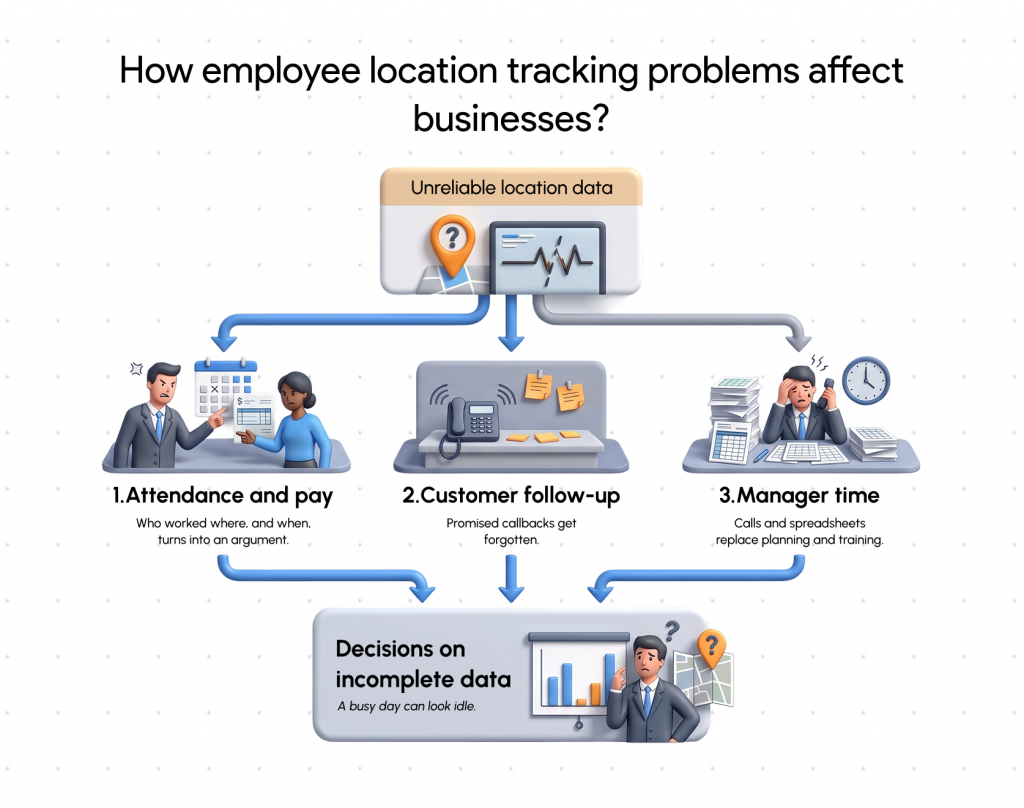
The previous issues go beyond simple technical annoyances. There are four ways they affect day-to-day activities.
Inaccurate Attendance and Field Activity Records
The records are difficult to trust when there are missing check-ins and approximate locations. Instead of being simple checks, questions regarding who worked where and when became arguments. Small mistakes can cause problems if attendance is used to calculate incentives or salary.
Missed Customer Visits and Delayed Follow-Ups
It is impossible to determine which clients were satisfied and which were not if visit data are not clear. Accountability becomes ambiguous, promised callbacks are forgotten, and follow-ups fall short. Even though managers are unable to see the flags, customers are aware of them.
Increased Manual Work for Managers
The workload is increased by unreliable data. In addition to collecting status messages and negotiating spreadsheets, managers make several calls. Territory planning or team training could take up that time. Additionally, it interrupts field workers’ attempts to work.
Poor Decisions Based on Incomplete Data
Route, workload, territory, and performance evaluation decisions shouldn’t be based on inaccurate information. A busy day can appear idle due to a missing data point, which is not fair to the employee and misleading to the company.
Employee Privacy and Compliance Challenges
Even if a tracking system is technically sound, it can nevertheless fail if privacy is neglected. Employers are in charge of how they gather and utilize location data.
Employee Concerns About Continuous Monitoring
The technology itself is the primary concern. It is the goal and extent. Workers want to know why location data is ON, whether it is done continuously or only sometimes, and how it will be utilized for making decisions.
Risks Associated With Off-Duty Tracking
One of the most common employee concerns is tracking that continues after business hours.
Boundaries for working hours: Track only during working hours.
Limitation on purpose: Only gather location data for specific commercial purposes.
Access: Make the information visible only to those who require it.
Retention: Choose how long to keep data on file and remove it when it’s no longer required.
Monitoring personal time can lead to significant privacy issues and, depending on where you operate, legal risks.
Protecting Employee Location Data
Location history should be handled carefully because it can expose personal patterns. This entails utilizing access controls, maintaining current security procedures, and providing information about who has read or exported data.
Regional and national laws differ. Location data is sometimes treated as personal data, which may result in requirements for security, retention, notice, and legal basis.
How Businesses Can Overcome Employee Location Tracking Problems
Even before any new software is considered, the majority of these issues can be minimized with improved behaviors and more explicit regulations.
Improve GPS Reliability and Location Updates
Although no system can guarantee complete accuracy, frequent causes of inaccuracy can be eliminated:
- Verify that location services are enabled and that the app has the necessary permissions.
- Check the background activity and battery-saving settings on employees’ phones.
- Make plans for inadequate coverage areas.
- To determine how recent a data point is, read timestamps and locations.
- Consider a place as a general area rather than a precise location.
- Establish Clear Attendance and Visit Verification Processes
Establish a single, uniform method for checking in and out, as well as the requirements for each visit record. Examine exceptions, including very brief visits or missed check-ins regularly.
Create Transparent Employee Tracking Policies
Keep the policy straightforward and write it as a document. It provides clarification such as:
- Why is location monitored?
- Tracking’s active and inactive states
- Who has access to the data and how long it is stored
- How workers may voice concerns or make corrections
- Use Reliable Employee Location Tracking Software
- Dedicated software can consolidate check-ins, location updates, and visit data into a single report.
What to Look for in an Employee Location Tracking Solution
Determine what issues you need to resolve before comparing vendors. Then evaluate each choice using standards such as these:
Location visibility: How well does it display people’s whereabouts, and how does it identify updates that are missing or delayed?
Attendance workflows: Can it manage approvals, edits, and check-ins as your policy specifies?
Visit records: Does it record more than just a map pin, such as timestamps and visit details?
Reporting: Do reports provide adequate clarity and consistency for action?
Ease of use: Will employees actually use it on their own phones daily?
Fit with field workflows: Does it suit your team size, industry, and daily routine?
Lystloc’s employee location tracking software, designed for companies that oversee field teams, is one choice to consider. As with any product, make sure it satisfies your privacy and compliance requirements by comparing its existing features and documentation to the above criteria.
Explore the Best Employee Location Software for your Business
GPS has limitations; regular check-ins are necessary for attendance, visits require more than a map pin to be validated, and team members must believe. Clear communication, effective procedures, and the appropriate tools all work together to produce reliable tracking.
Learn more about field employee tracking on the Lystloc website now.
Try your free demo here!