Managing a team of field salespeople is quite difficult. You need to set objectives, but you will not see your field team regularly. You don’t know where they are, who they see, and, most importantly, how much time they spend on the road vs. on the job.
How to Choose a Salesman Tracking App
Table of Contents
Field managers often rely on manual attendance logs, end-of-day calls, and WhatsApp messages, but these methods are not effective. A salesman tracking app helps bridge this gap. There are many tracking apps available in the industry. Many feature pages look similar. Choosing one based only on price leads to an unsuitable solution. This blog takes a different approach. Instead of listing every app’s features, it outlines ten key features to look for, explains why they matter for field sales, and suggests questions to help you evaluate your options before deciding.
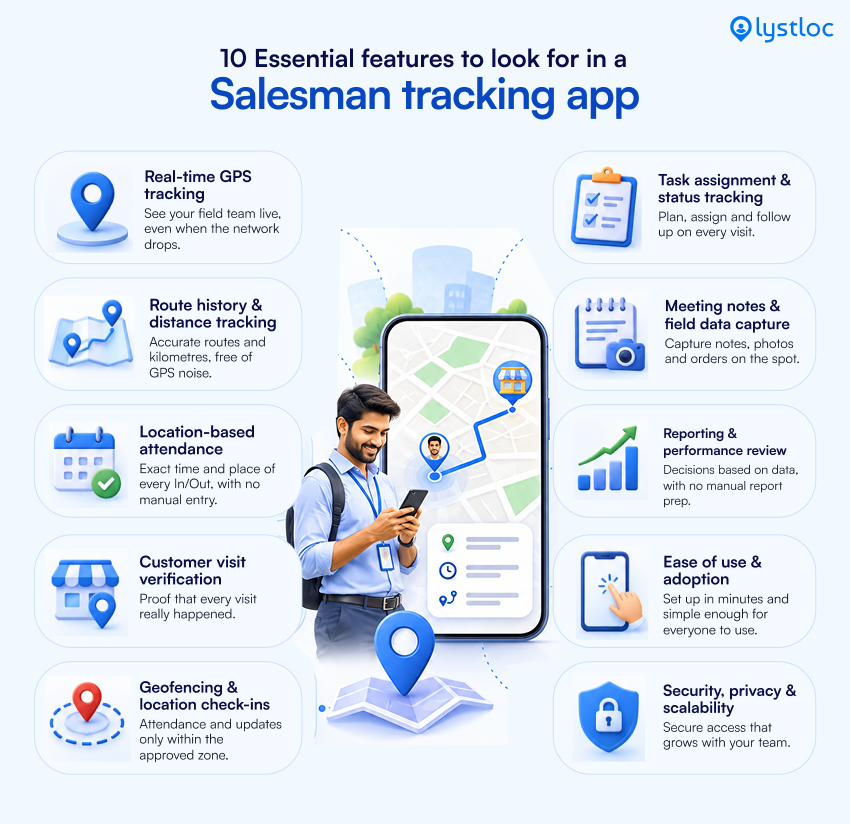
10 Essential Features to Look for in a Salesman Tracking App
1. Real-time GPS location tracking
How it works:
It uses the GPS on your field representatives’ phones to show their location during work hours, usually on a live map.
Why is it important:
When a salesperson is delayed, or a client requests an urgent visit, you can respond with real data. It also helps quickly reassign leads to the nearest field employee.
Things to consider:
- How often does the location update, and can you set that interval?
- Does tracking continue when the app is running in the background or the phone screen is locked?
- How does the app handle poor network coverage?
- Does it sync stored locations once connectivity is restored?
- Can you restrict tracking only to business hours?
Help desk: Live employee location tracking is the main factor for real-time visibility. Use the above questions to evaluate how each service handles poor connectivity and background tracking.
2. Route history and distance tracking.
How it works:
It tracks a representative’s daily route, the distance traveled, and the time spent at each stop.
Why is it important:
The live location shows current movements; route history helps you understand what happened throughout the trip. It helps identify inefficient routes, verify travel claims, and plan more effective sales areas moving forward.
Things to consider:
- Can you view and export historical data from a specific time period
- Does the distance use straight-line points or the actual route taken
- Can you also see stops and idle time in addition to the map’s line?
3. Location-based attendance
How it works:
It records the time and location of an employee’s check-in and check-out.
Why it’s important:
Field teams move between different locations. Without their location, we can’t identify where they are and what they are doing currently. Location-based attendance avoids manual registers, fewer disputes, and better payroll record accuracy.
Things to consider:
- Can I take attendance from anywhere or within any radius?
- Does it handle leave, half days, and late marks as per your HR policy?
- Can attendance data be exported to payroll?
4. Customer visit verification
How it works:
This feature confirms that a salesperson actually visited a customer’s location, typically by checking in at the time and location of the visit.
Why is it important:
For most sales managers, this is the key challenge. Without verifying visits, you can’t trust activity reports. You need proof that every client visit has happened.
Things to consider:
- Can a check-in be validated against a customer’s saved address?
- Is there a record of how long the representative was at the location?
- Can your process allow reps to add notes or photos as support if needed?
5. Geofencing and location-based check-ins
How it works:
You can create a virtual boundary around your preferred locations such as a customer site, office, or territory. The system can then flag entries and exits or allow check-ins only within that area.
Why is it important:
The geofencing feature allows for automatic verification. You don’t need to check on each visit; Instead, you can identify which field employee is far from the customer’s actual location.
Things to consider:
- Can you provide the radius for each location?
- Does the app support multiple geofences for different customers or regions?
- What happens if the representative is outside the geofenced area?
- Is the check-in prevented or marked for review?
6. Field task assignment and status tracking
How it works:
It enables managers to assign visits or tasks to representatives and track the status, such as pending, in progress, or completed.
Why is it important:
Knowing where your field employee is not enough. You also need to know what they were supposed to do and whether it was completed. Task tracking links your location to what the field team actually performed.
Things to consider:
- Can I assign tasks individually and in bulk?
- Can representatives update the status from the field with a few taps?
- Do managers receive notifications when a task is completed or missed?
7. Meeting notes and field data capture
How it works:
It enables representatives to record results, notes, order details, or other relevant information immediately after a customer meeting.
Why is it important:
Mostly, insights gained during field visits are lost between the customer’s location and the office. Managers can follow up more effectively when they have real-time information.
Things to consider:
- Can the fields be customized to fit your sales process?
- Can I add notes for a specific visit or client?
- Are location records reviewed alongside captured data?
8. Reporting and performance review
How it works:
This feature converts bare location, attendance, and activity data into visits, travel time, coverage, and productivity reports.
Why is it important:
If you do not review the proper report, you won’t use it. With accurate and good reporting, you can compare your reps’ performance in the field. You can see where coverage is weak and prepare for review meetings in minutes, not hours.
Things to consider:
- Which reports are available out-of-the-box and which need customization?
- Is there a way to sort by date, team, region, or person?
- Do the reports answer your top three management questions?
9. Ease of use and employee adoption
How it works:
This refers to how easy the app is for your representatives to use, not just for managers.
Why is it important:
If an app is slow, confusing, or uses too much battery, employees don’t prefer to use it.
Low adoption leads to incomplete data, which means the app won’t be useful for your business.
Things to consider:
- Can a new representative start using the app with little or no training?
- How much battery and mobile data does it use?
- Does it work on the phones your team currently uses?
- Is it clear to employees why tracking is happening?
10. Data security, privacy and scalability
How it works:
This explains how the provider stores location data, who can access it, and whether the platform can grow with your team.
Why is it important:
Location data is private, so you need control over who sees it and when tracking is active.
As your team grows, the app should handle more users and more areas without becoming harder to use.
Things to consider:
- Can you set different access levels so managers only see their team’s data?
- Is tracking limited to work hours?
- Can employees see when it’s active?
- How is data protected, and how long is it kept?
- Does the pricing and performance stay good as you add more users?
We have discussed about 10 features that you really need to consider before choosing a salesman tracking app. This gives a detailed version of how it works, what the things to consider are, and why it is important for your business.
How to Evaluate a Salesman Tracking App for Your Business
Once you know which features are important, the next step is to see how well each app fits your needs.
Keep a close eye on these six areas.
Fit with team size and workflow.
A team of five retail stores has different needs than a team of 300 handling complex B2B deals. Map your workflow first, then check if the app fits.
Location reports
Decide what you actually need to see: positions, visit proof, route history, or all three. Don’t pay for features you won’t use. Don’t find out about missing features after you’ve started using the app.
Ease of adoption
Run a pilot with two or three representatives. Their feedback on how easy it is to use and how much battery it uses will tell you more than any demo.
Data access, privacy, and security
Ask who in your company can see location data, how it’s protected, and how long it’s kept. Make sure your tracking policy is clear to employees and follows all laws.
Plan limits
Check what is included in each pricing plan, whether features are locked behind certain plans, and how costs change with more users. Ask about minimum user numbers and contract terms.
Scalability
Think about where your team will be in two years. Territories, users, and reporting needs usually grow, so the app should grow with you.
Choose a Salesman Tracking App That Fits Your Field Sales Workflow
The best salesman tracking app isn’t the one with the most features. It’s the one that answers your management questions, is simple enough for your team to use every day, and protects the data it collects.
Start with the basics: reliable real-time location, route history, and location-based attendance. Add customer visit verification and geofencing if proof of activity is your concern. Then look at task management, field data capture, and analytics if you want to improve how the team works, not just where they go.
If you’re considering providers, Lystlocs Employee Location Tracker is worth reviewing against these criteria in this blog.
Check each capability against your requirements and ask for a trial so you can see how it performs with your team before deciding.
Explore Lystlocs Employee Location Tracker now.