On average, about 72% of sales professionals actively use CRM tools, with most organizations seeing a return on investment within 12 months.
This could be your reason to come all the way to integrate the best CRM within your field sales management software. Perfect!
But googling the steps for “how to seamlessly integrate a field sales CRM” could be overwhelming. That’s why we’ve crafted this blog for you to provide handy, crisp, and informative guidance. Let’s have a look!
Factors that You Must Keep in Mind Before Proceeding with Field Sales CRM Integration
Table of Contents
After all, you’re investing in the best field sales CRM to drive business success. So, beyond just budget and benefits, there’s more you should consider. What are they?
1. Compatibility
Think of it like you’re plugging a new gadget into your old setup. What would you check? At first, you’ll definitely know whether it sparks flawless execution or creates hurdles.
Just like this, while you choose to integrate best mobile CRM features into your field sales tracking system, you can check its pre-built integration setup or ensure smooth custom integration with both applications’ APIs. And, of course, you must check the technology stack, likely on-premises or cloud infrastructure, to align your systems.
2. Customization flexibility
Do you know what a rigid field sales CRM feels like? Buying shoes two sizes too small, as most CRM comes with pre-set, limited customization rules. But an easy-to-use and flexible CRM can give you ample amount of space to tweak reports, forms, fields, modules, dashboards, and, in fact, alerts and notifications.
The reason? It helps you build the custom workflow and trigger automation the way you and your team need. For example, when your field sales rep completes tasks, the task status automatically updates as “Done”. Be cautious, as it can make or break your existing setup.
3. Field mapping and data synchronization
You need uninterrupted and flawless data flow between your field sales management system and the third-party CRM application. Why? Your target is to build a customer journey and make them your brand advocate.
For this, you need to ensure both systems stay synchronized. For example, you can check “contact name” in CRM should match “client name” in your field sales tracking app. Also, don’t forget to verify how often, where, and in which direction the data syncs and updates.
4. User permission & access control
You already know everyone doesn’t need the master key to look through every crucial information about your customer. So when you choose a mobile sales CRM to fix common field sales mistakes, check whether it allows you to keep your data tidy and safe.
If so, you’ll be allowed to set custom user access, role, and permission-based modification, and share data across both systems.
By controlling disciplinary actions, you can ensure everyone – managers, reps, admins – gets their lane. Most importantly, you can avoid unauthorized access and data breach obligations.
5. Data accuracy & consistency
Therefore, when you set up the CRM integration process, you must identify and manage accurate and consistent data flow during migration. A clean, uptodate, and organized data help you minimize errors, data duplicacy, and data decay in the long run.
6. Data backup, recovery & optimization
Does your preferred field sales CRM allow you to recover and retain data without discrepancies or security risks? You must ask.
If you can’t afford to compromise on data integrity or downtime, have a recovery plan ready in case things go wrong during integration. After deployment, keep your CRM optimized with the latest updates to prevent performance lags.
7. Security & compliance
If both of your field sales management software and field sales crm adhere to the law, be assured that you are far away from data theft and violation of confidentiality.
To ensure it, you must check encryption, API integration security, and industry specific regulations such as GDPR, CCPA, etc. It will confirm you’re not compromising customer and employee workflow data protection.
9. Quality support assurance
Before fully rolling it out, test, test, and test again. Small pilot runs reveal issues early and save you big headaches later.
These tests include multiple factors, likely, unit testing, integration testing, and user acceptance testing. Ultimately, when you prioritize error-handling mechanisms, you ensure seamless data sync and flow between your chosen platform. That’s really needed!
Process of Field Sales CRM Integration in Your Existing Sales Tool
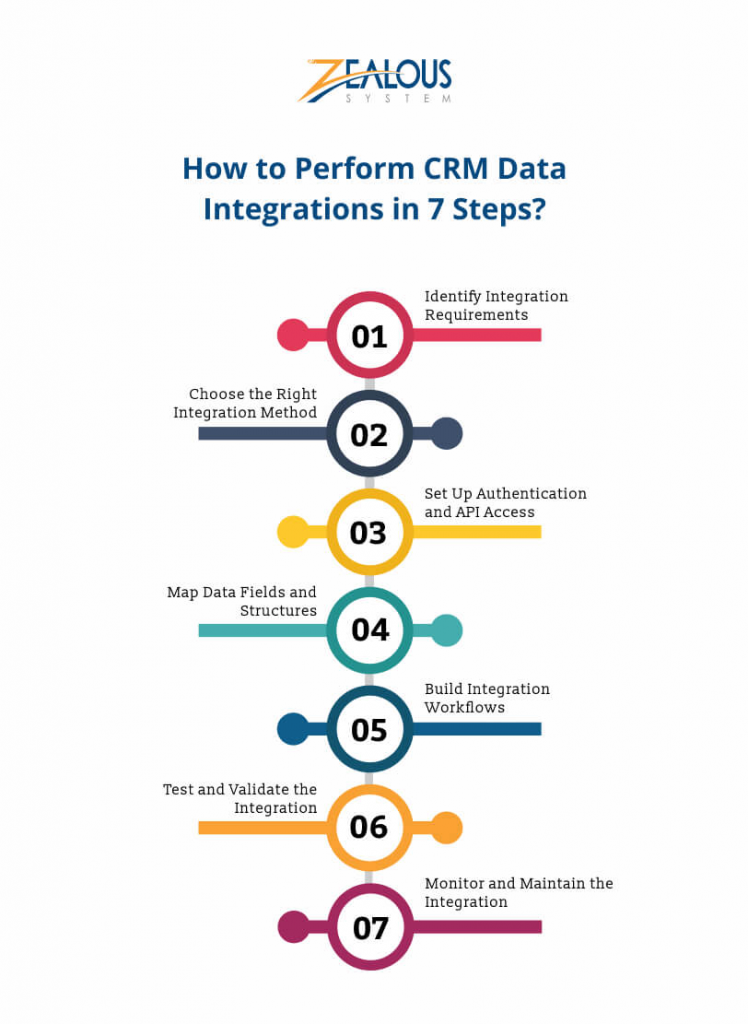
You’ve checked all the boxes – compatibility, security, accuracy, and budget – now it’s time to bring your field sales CRM to life. The smoother the onboarding process, the faster the result. To get it done, you can follow the steps as explained below:
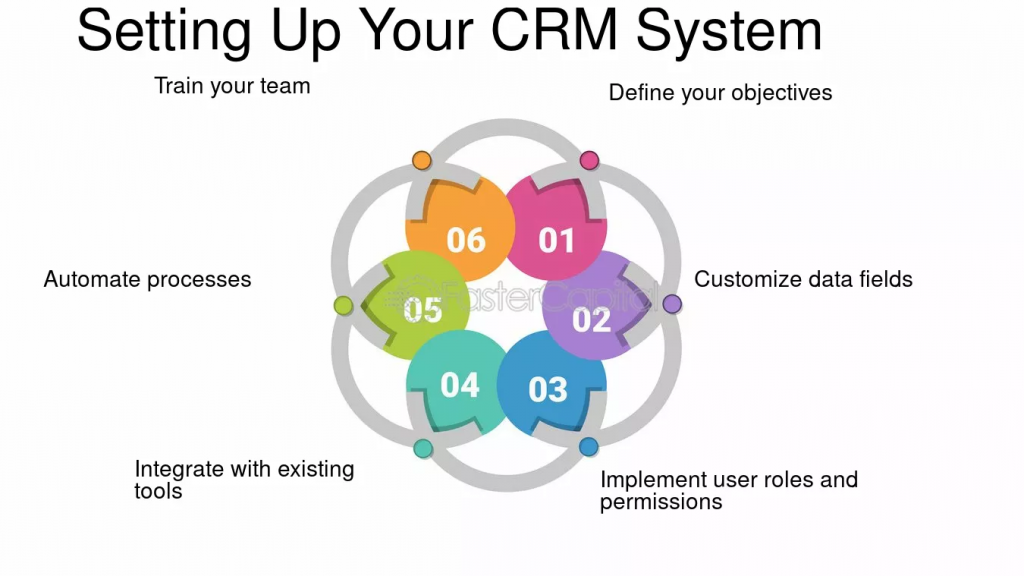
1. Define your objective and requirements
What’s your ultimate goal? Do you define it before integration?
You may need automation and synchronization for location-based and lead-based sales activities, geofenced customer data, or unified employee attendance and leave records.
Or perhaps real-time notifications and updates flowing in and out of your CRM – syncing only the necessary data points, not everything.
Clearly jotting down your requirements beforehand helps prevent potential issues before they escalate.
2. Prepare your team & choose a compatible field sales CRM together
When adopting a CRM and managing customer or sales data, your sales team can easily feel overwhelmed – especially if the system is too complex. Instead of leveraging mobile sales CRM benefits and closing deals, they may end up struggling with data entries.
That’s why it’s crucial to choose a CRM that’s intuitive and easy to use. Ensure both your tools – the field sales CRM and the sales management software – are fully compatible.
For added assurance, review their APIs to confirm they support smooth data migration, exchange, and retention, along with options for custom integration.
3. Plan, choose, and configure the integration
When you plan the integration process, you must be careful especially in three areas:
- Data points: What common data points should exist – location tracking, geofence-based visits, field sales reports, territory based sales outcomes, or others?
- Data flow: What should be reflected in both apps? For instance, when a sales visit is completed, it should auto-update in the CRM as “Done.” Similarly, new leads in the CRM should auto-assign to the rep with the fewest tasks.
- Triggers and automation: for instance, if a user’s location accuracy is low, the field sales software should auto-flag it and update the CRM instantly.
Apart from this, pay close attention to crucial details like API credentials, accurate data mapping, and selecting the most suitable integration method – whether native, third-party, or custom.
Overlooking any of these can lead to inefficiencies and create bottlenecks in your workflow.
4. Test and implement the integration
Now, you’re almost in the last stage of the CRM integration process. Yes, only testing and deployment are needed. So how and why would you make it happen?
- Try doing what real sales leaders do every day – they turn every activity into impactful insights. For example, add a new customer to the CRM. Now check if this customer pops up in your field tracking app. Change a task’s status or log a field visit, then see that the updates show correctly in both systems. If everything matches – great! If not, note what’s missing.
- Pick key details like customer names, addresses, visit times, and task statuses. Write down what these look like in the CRM and check if they show up the same in the field tracking tool. If you spot a mistake or a number doesn’t match, record it. Repeat this for different records to make sure all fields (big and small) are syncing perfectly.
- Pretend something goes wrong. For example, turn off your internet and enter a customer, or purposely put in the wrong data. Watch how each system responds. Does it show a clear message? Does it hold onto the info until the connection comes back? Make notes on what happens, so you can be sure the integration keeps data safe and nobody gets stuck.
Without too much technical complexity, you can do it, finish your testing, and go live with deployment. Further, you must monitor CRM performance to know whether it’s functioning as expected.
5. Train your team to adopt the CRM and scale with it
Even the best CRM fails if your team doesn’t know how to use it. Offer hands-on training, walkthroughs, and quick tips to make adoption effortless. Moreover, as your business expands, your CRM should grow too. Keep tracking performance, add new features, and fine-tune workflows to match your team’s pace.
Let’s Wrap It Up!
Honestly, integrating a mobile CRM from scratch can be time-consuming and tricky. But what if your field sales software came with a built-in, AI-powered CRM?
You might assume it’s pricey – but it’s not. At just ₹639, you get an AI CRM with location intelligence, no complex setup, and zero compromise on features.
Simply plan, create, and customize your workflow—the platform handles the rest. Ready to simplify your sales game? Book a demo and see how effortless it can be.
Book a Demo