CRM hygiene? Sounds weird!
We know, a software can’t remove the dirtiest, wasted, or oldest parts within it by itself, after all.
But you can! Think of keeping your mobile CRM data on point, updated in real-time, consistent, and absolutely without flaws. You can just squeeze out any information without lifting your finger, making efficient workflows, good strategic decisions, and sales pipelines moving without lost opportunities.
This is exactly what maintaining CRM hygiene means. Now, you might have thought, is it just a software cleaning process? Isn’t it a really boring task to do? What if it gets overlooked?
Well, it’s not just cleaning space but keeping your customer data accurate and reliable. And, if you don’t follow it, you might lose $13million annually.
And, yes, it’s really a boring to-do list to maintain, but we’ll give you the solution on how it makes you feel less bored but efficient. So, let’s disclose the info!
Good vs Poor CRM Hygiene: How It Impacts Your Bottom Line of Field Sales?
Table of Contents
| Aspect | Good CRM Hygiene | Poor CRM Hygiene |
| Duplicate records | One consolidated record per contact, ensuring clarity. | Multiple conflicting entries for the same contact. |
| Customer profiles | Complete profiles with updated info, past interactions, and key details. | Profiles missing critical details, or filled with outdated info. |
| Data relevance | Regularly updated to reflect current business needs. | Filled with stale data. |
| Lead prioritization | Accurate lead stages and scoring setup based on clean data. | Leads mismanaged due to errors or missing insights. |
| Sales follow up | Timely follow ups lead to conversions. | Missed or redundant follow ups lead to missing opportunities. |
The quick shot to comparison directly tells about what makes the difference. And, precisely, here’s the impact what we mean actually:
- Improved accuracy in field sales reports and forecasting opportunities
- Increased field reps’ productivity and efficiency (with less admin, more selling)
- Clearer visibility into pipeline status, sales stages, and deal progress
- Improve higher CRM usage, adoption, and acceptance across the team
When these are aligned systematically, it reflects on your field service KPIs too and opens a new door to lead-to-opportunity and conversion. Yes, you could do it with a little bit of effort. Promise!
What Does Eat Up Your CRM Hygiene?
Here’s a crazy truth: your field sales reps aren’t data entry clerks so they’re asked to update customer, lead, or on-site meeting details on the CRM every time they’re winding up. Neither are they Superman that they can’t mix up information like the way a barista could do it while serving coffee during peak-demand hours.
Yet, a mobile CRM hygiene demands it – and, a constant manual check up. Exactly here the real struggle starts – the process feels lengthy, the system becomes cluttered, error-prone, and confused.
And, what makes things worse (examples say it loud, clear)?
- Duplicate data: say you’re generating a report and found “John D.”, “Jonathan Doe”, and “J. Doe”, all showing up as three different people, leading to missed follow up.
- Missing data: did you ever pull up a customer record with the phone number or the billing address field left completely blank?
- Incomplete data: think of the time when you saw a delivery address saved as just “New York” with no street, zip, state, or house number.
- Outdated data: like everyone else, you might send a mailer to someone, a decision maker, who left the company two years ago.
Unfortunately, all these things compound errors, leading to mishaps in poor CRM hygiene, making your sales reps slow, damaging customer relationships, and, of course, your brand reputation.
The solution? Coming up with the best practices that you can maintain hygiene with mobile CRM automation as a priority, making it always-on BTS work, instead of treating it like a one-time project.
How to Maintain Mobile CRM Hygiene (with 5 Easy Steps)?
1. Set well-defined rules and boundaries to avoid duplicates
For field sales teams, CRM rules act like ground instructions to keep data clean and consistent. You can set standard formats for customer names, company addresses, job titles, etc.
For example, decide whether customer names are always entered as “First Name + Last Name” instead of variations like “R. Sharma” or “Raj S”, whether business names should follow “Ltd.”,”Limited “, or “Inc” conventions, or the job title must be in acronyms like “COO” or just simply “Chief Operating officer”.
That way, when a rep searches the customer communication history in CRM before a visit, they instantly find the right details without wasting time cross-checking and filtering out duplicates.
2. Enforce standardization to combat data decay
Reserving database integrity and implementing standardization can prevent data degradation and block malicious entry before it altogether spoils your pipeline.
Here’s how it can be done:
- Real-time sync: think of using a business card to pull out customer contact automatically, or use a CRM (like LystCRM) that is powered with location intelligence and sync data at the right time from the right place.
- Bulk enrichment: when you’re allowed to clean up large sets of data, upload entire lists of leads and location-based assignments, and share them with your N number of field sales reps.
- Custom module utilization: create and customize dedicated forms, fields, and dropdown menus for site visits, meeting notes, or territory assignments to avoid free-text clutter.
- One-click usability: because your reps should spend on impressing your customers and boosting sales conversions, instead of doing PHD in pushing data into their mobile CRM.
- And, room to grow: your targets, workflows, teams, and customers are eventually growing, and the CRM should help you make a bigger impact. No compromise, please!
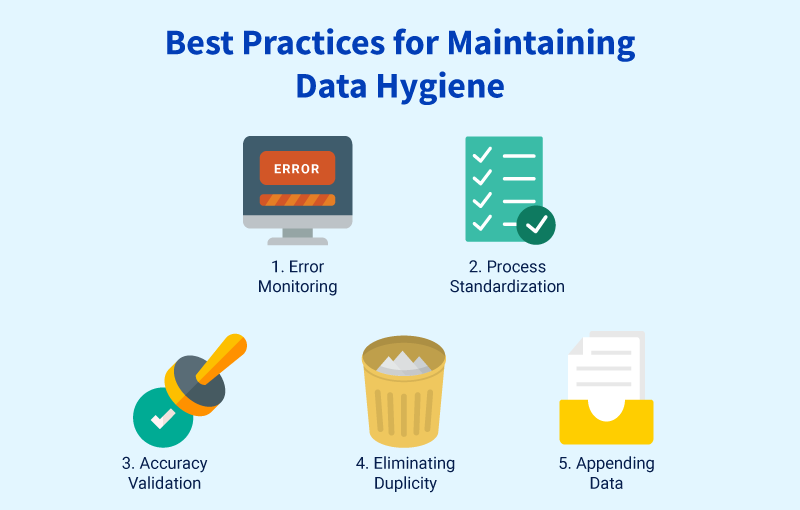
3. Perform consistent CRM audit
You may schedule a CRM audit of your choice, weekly, monthly, or quality, but practice it with consistency (No more, “I’ll do it later”). While following the process, your steps must include all of these 👇
- Review CRM setup, customization, and its goals to align your system with how your field reps operate
- Validate data quality by ensuring its accuracy, completeness, relevance, and timely updates.
- Verify regulatory compliance by checking documentation and its reflection on current usage.
- Prioritize high risk data segments to maximize higher ROI effort.
Oh, and do one more thing. Split your audit results into:
- Immediate fixes (e.g., push mobile sync bug fix)
- Short-term actions (e.g., improve user training on logging activities)
- Long-term upgrades (e.g., overhaul field-friendly dashboards or forms)
Just do it for your own sake. It’ll further reflect on your dashboards – pipeline health, win/loss trends, sales metrics, and reps’ performance – without manual tweaking.
4. Apply role-specific access permissions
Not every field sales rep should edit every field. Define clear roles; in fact, set hierarchy-based permissions so data remains protected. When fewer people are involved in editing critical information, data security and integrity accelerate naturally.
The effect is undeniable. What if you get practical knowledge by just booking a demo with LystCRM?
Book a DemoIn a pharma sales team, for example, a Medical Representative (MR) should only be able to update doctor visit details, prescriptions discussed, and meeting notes. But pricing details, product discounts, or territory reassignments should be editable only by the Area Sales Manager (ASM) or Regional Head. This way, MRs focus on field updates, while sensitive commercial data stays accurate and secure under managerial control.
5. Promote openness and team collaboration
Field reps are the first to spot changes – like a doctor switching clinics or a client updating their number. They should have a quick way to flag and update those details in the CRM.
At the same time, when field managers gather new lead intelligence or campaign responses, that information must flow back into the CRM so reps see it before their next visit.
This two-way sharing ensures data stays current, reduces miscommunication, and helps field teams work from the same source of truth, scaling conversions faster.
Let’s Wrap It Up!
Get more out of your CRM, turn on mobile CRM automation.
With Lystloc-powered LystCRM, you can receive a real-time visibility of what’s going on field, auto-update details, store a larger portion of complete, usable records, set role-based access, and track timeline history – prevent all kinds of bottlenecks before they creep into your CRM.
Ultimately, you can keep things smooth, hygienic, and reliable at any point of time – no extra effort is required. Hey, this is for you. Keep happy selling!